rungentFor developersConcepts
Surfaces
Where your users and their agents reach your product through rungent, and what you decide about each. The dock, ⌘K, MCP, your branded CLI, skill.md and llms.txt all draw from one catalog, act as the user, and ask before every write.
| Surface | Who uses it | What it offers | How a write is confirmed |
|---|---|---|---|
| The dock | Your users, beside your pages | Operations on agent, search, forms |
An approval card |
| ⌘K palette | Your users | Search over every source | Nothing to confirm |
MCP (/mcp) |
Claude Code, Cursor, Codex, other agents | Operations on mcp, search |
MCP elicitation |
| CLI | People and agents in a terminal | Operations on cli or mcp, search |
[y/N], or --yes |
skill.md, llms.txt |
Agents finding their way in | How to connect, and the operations | Not a caller |
Every surface calls your API as the user and shows only what that user's catalog holds. This page is what each surface offers and what you decide about it. How your users work with them is under For users: Use the assistant, Use the CLI, Use MCP and Use with coding agents.
Which operations appear where#
An operation's surfaces lists the surfaces that offer it. Reads default to all three; writes to
agent and cli. So MCP starts read-only, and writes reach a terminal through the CLI, which
asks before each one. Set the list to change that:
{ "name": "stop_vm", "effect": "update", "surfaces": ["agent", "mcp", "cli"] }
Role operations appear on no surface; search reaches every surface through the built-in
search tool instead.
The dock#
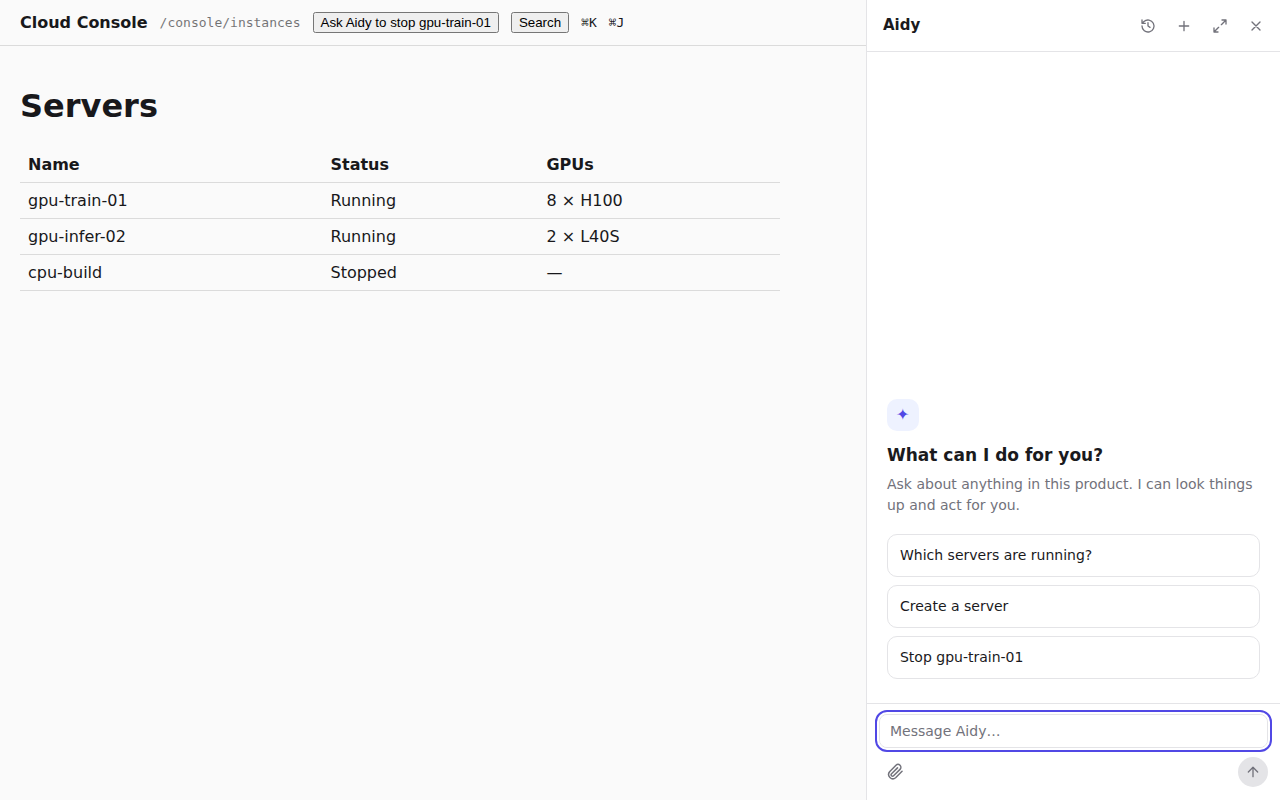
The dock opens beside your page and takes its room from the page instead of covering it, so the server list the assistant just changed stays in view. You decide what it starts from: your suggestions, the context of the page the user is on, your forms, your router for the pages it opens, and whether users may attach files. Those are props, on JavaScript.
⌘K search#
SearchPalette opens over every search source, grouped by type, and hands a query
it cannot answer to the dock as a question. You decide which sources exist; each hit links to the
url your source gives it.
MCP for coding agents#
Every rungent host serves MCP over streamable HTTP at <host>/mcp. A client signs in with a token
your API accepts as the user's (a personal access token, an API key or an OAuth access token),
and gets one tool per operation on mcp, plus search. rungent forwards the token on every call and
never stores it. Each tool carries hints from its effect (readOnlyHint, destructiveHint,
idempotentHint), and the client receives your skill guide as its instructions unless you set
mcp.instructions.
The simplest way to give users a token is a page in your product where they create one for their agents, scoped and revocable like any other API token. How they connect Claude Code, Codex, Cursor and other clients is on Use MCP.
Sign in with OAuth#
Clients that support MCP authorization can sign the user in through your OAuth server instead of
a pasted token. Name it with mcp: { authorizationServers: ['https://auth.example.com'] }
(RUNGENT_MCP_AUTHORIZATION_SERVERS with rungent serve). rungent then serves
/.well-known/oauth-protected-resource/mcp, and a request to /mcp without a valid token answers
401 with a WWW-Authenticate header that points there. The client runs the sign-in and retries
with the access token. Your server issues the tokens and your API checks them; rungent only forwards
them.
When MCP misbehaves#
| What users report | Why, and what to do |
|---|---|
401 on connect with a token that works on your API |
Your identity operation refuses that kind of token. It must accept the tokens you hand out for agents. |
| A write is missing from the tools | Writes are on mcp only when listed in surfaces, and only for users who may use them. |
404 session_not_found again and again |
Behind several replicas, a session must stay on one replica (Deploy). |
| OAuth sign-in never starts | Route /.well-known/oauth-protected-resource/mcp to rungent along with /mcp. |
A CLI with your name#
acme login https://console.example.com
acme vm stop gpu-train-01
Stop server gpu-train-01? [y/N] y
{ "id": "vm-42", "name": "gpu-train-01", "status": "stopped" }
The CLI has no commands of its own for your product: it connects to <host>/mcp, lists the
operations the signed-in user may use, and turns each into a command. A new operation is a new
command the next time it runs, with nothing to republish. What users do with it is on
Use the CLI.
rungent brand writes a small npm package whose bin is your command:
npx rungent brand --name acme --host https://console.example.com -o acme-cli --npm-name @acme/cli
cd acme-cli && npm publish --access public
It reads ACME_HOST and ACME_TOKEN (or the variables you name with --env-host and
--env-token), keeps its own logins, and depends only on @rungent/cli, which has no
dependencies, so it installs in a second and a new rungent release reaches it as an ordinary
dependency update. Leave out --host for a product customers host
themselves. Every flag is in the CLI reference.
x-rungent.cli shapes the commands: {"command": "vm stop", "args": ["vm_id"]} turns
acme stop-vm --vm-id vm-42 into acme vm stop vm-42, and with resolve on vm_id,
acme vm stop gpu-train-01 works too.
skill.md and llms.txt#
rungent serves /skill.md, a skill an agent loads to use your product (how to connect, the safety
rules, every operation by area), and /llms.txt, the index of the same in the
llms.txt format. Both are generated from the catalog of whoever asks.
Asked without a credential, they list what your OpenAPI shows anonymously, or only how to connect
when your API asks for sign-in.
You choose the skill's name, a hand-written guide placed first, and the CLI the documents tell
agents to install, on Configure. rungent docs writes
the same documents as files for your docs site. How users hand them to their agents is on
Use with coding agents.
Where to go next#
JavaScript mounts rungent and the dock in your app.
For agents: surfaces.mdEdit this page