# Forms and approvals
Every change takes one path. A request to create or change something opens your page's own form, prefilled; the submission becomes an approval card bound to its exact arguments; only an approval runs the call.
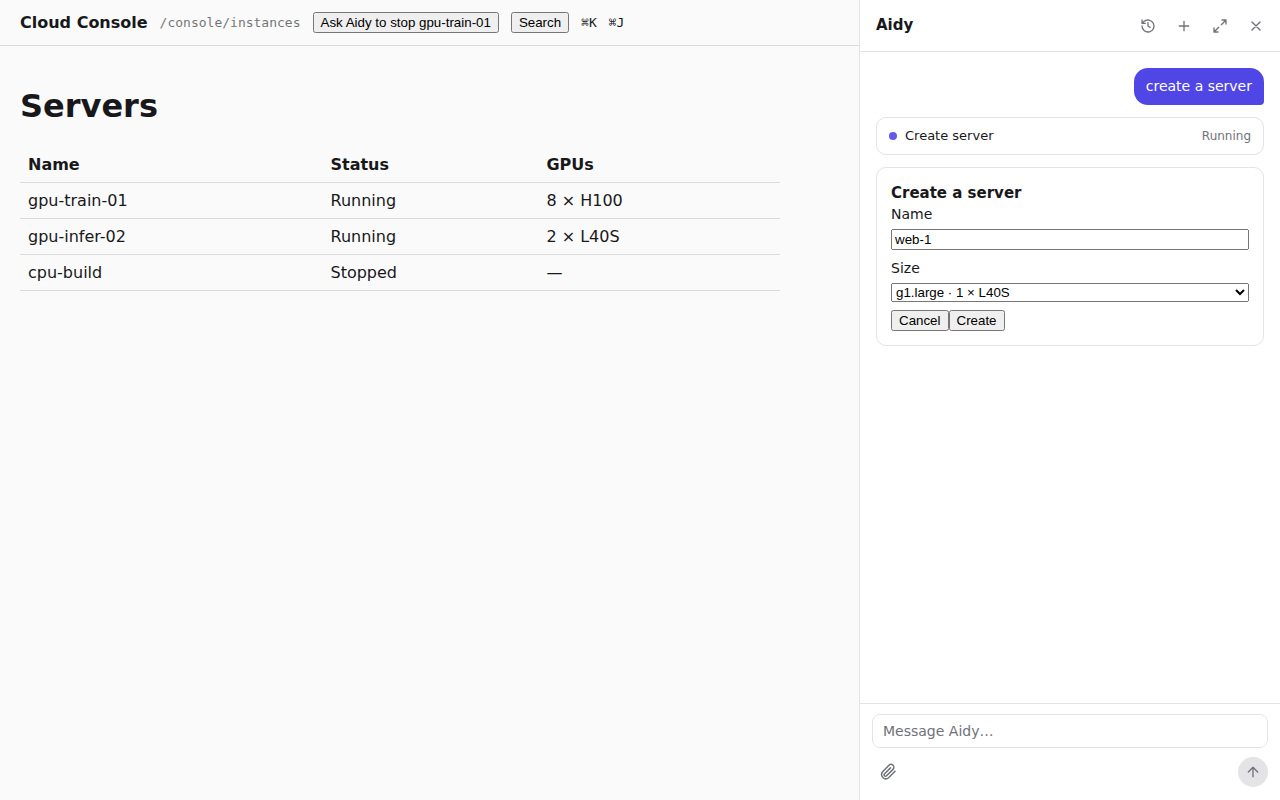
- Ask“Create a GPU server called train-01.”
- RouteOne quiet model call picks create_vm and keeps what the user said: the name.
- FormYour create form opens in the conversation with the name filled in.
- ResolveThe submission is validated, and names become ids.
- ApproveA card shows exactly what was submitted; the user approves it.
- RunYour API receives the call with the approval's id and authorizes it.
## Why one path
A model asked to create something improvises: it lists the fields in text, guesses a zone, or
asks three questions in a row, and the next run does something else. Your product already has a
form for this, with its options, defaults and checks. An operation that names a form gets its
input only from that form, and every write waits for a card the runtime shows, not the model.
The same request takes the same path every time.
## Declare the form
The operation names a `role: form` operation of your API:
```json
"/api/vms": {
"post": { "x-rungent": { "name": "create_vm", "description": "Create a cloud server (VM).", "form": "vm_form" } }
},
"/api/vms/form": {
"post": { "x-rungent": { "name": "vm_form", "role": "form" } }
}
```
A form operation is a `POST` that changes nothing, so rungent treats it as a read that needs no
approval. rungent sends it the arguments known so far, and it answers a generic description of the
form, so it can offer only the zones the user's quota allows:
```json
{
"prompt": "Create a server",
"questions": [
{ "id": "name", "prompt": "Name", "kind": "text", "required": true },
{ "id": "zone_id", "prompt": "Zone", "kind": "choice", "required": true,
"options": [{ "id": "z1", "label": "Beijing A", "recommended": true }, { "id": "z2", "label": "Beijing B" }] }
]
}
```
Each question's `id` is the dotted path of the argument it fills (`zone_id`, `network.cidr`). A
form has 1 to 24 questions, each `text` or `choice` (with `multiple` and `allowCustom` when
needed); the full shape is in [HTTP API](http-api.md#form-rungent-form). Your web app shows its own
form component instead, and clients without one show this.
## Routing sends the request to the form
When the catalog offers operations with a form, each new user message first goes through
**routing**: two quiet model calls in parallel that see only those operations and a `continue`
tool. If both pick the same operation, rungent opens its form at once and the agent loop does
not run; if they differ, the message goes to the agent, so one stray pick never opens a form
nobody asked for. A request still goes to the form when it also asks to be asked first,
or names an option that may not exist: the form is where those are answered.
Anything else, a question, a lookup or "stop gpu-train-01", goes on to the agent. Routing emits
no events and adds nothing to the conversation.
## Show your page's own form
Register the component your create page uses, by operation name, with `forms` on
`RungentProvider`:
```tsx
import { RungentDock, RungentProvider, type HostFormProps } from '@rungent/react';
import { CreateVmForm } from './vms/create-vm-form';
function CreateVm({ arguments: args, issues, submit, cancel }: HostFormProps) {
return ;
}
{page}
```
| Prop | What it is |
|---|---|
| `op` | The operation the form is for |
| `arguments` | What to start from: what the user said, or their last submission |
| `issues` | `{path, message}[]`: why the last submission was refused; empty the first time |
| `submit(args)` | Sends the operation's complete arguments |
| `cancel()` | Closes the form; the call does not run |
The form starts from the arguments the user stated; ones the model got wrong are left out. rungent
validates the submission against the operation's input schema. One that does not fit opens the
form again with an issue per problem (`{"path": "zone_id", "message": "required"}`), and nothing
runs. One that fits goes on to name resolution and the card.
## Ask which one
The agent has one more way to ask: the built-in `request_input` tool, for which thing or which
action the user means, offered as choices. "Stop the gpu server" with two servers named alike
asks which one instead of guessing, and the model asks with this card, never with a question in
its answer. It also asks for a value only the user knows, such as a tracking number, when the
operation has no form. It is never used for the inputs of an operation with a form, which belong
to the form, or for permission, which belongs to the approval.
A final answer that ends with a question anyway ("Which pipeline do you mean?", or "Tell me which
pipeline.") is withdrawn before the run ends, and the model gets one more step in which it must
call a tool: the card for a question, or the write itself when it asked permission in text, but
only a write whose form or approval card asks the user; a write with `approval: never` waits for
the answer.
An answer that says a change the user asked for was made when no write was called ("I've set
RMA-91453 to resolved.") is withdrawn the same way, and the next step must call that write, so
its approval card appears ([answer check](https://github.com/rungent/rungent/blob/main/spec/protocol.md#answer-check)).
The assistant also asks when the user did not say which record a change is for. A write must act
on a record the user named, saw in an answer, picked in a card, made with an earlier change in
the conversation or has open on the page; "Reply
to the customer" with several open conversations is refused before any approval appears, and the
model must ask which conversation with a card. rungent checks this itself, so it holds whichever
model answers ([named targets](https://github.com/rungent/rungent/blob/main/spec/protocol.md#named-targets)).
## What decides that a call needs approval
The operation's `approval` in the catalog, and nothing else: `always` by default for every
write, `never` for reads ([The catalog](catalog.md#effects-approval-and-surfaces)). The decision
is made in the runtime's code; no prompt or model output takes part in it, so the model cannot
talk its way past a card. Your API checks it again: the assertion of an `approval: always` call
must carry the approval's id as `apr`.
Before the card, rungent validates the input (or collects it through the form), resolves names,
and looks up the target's name, in that order. The first step that fails stops the call, and
nothing reaches your API as a write.
## Write the card
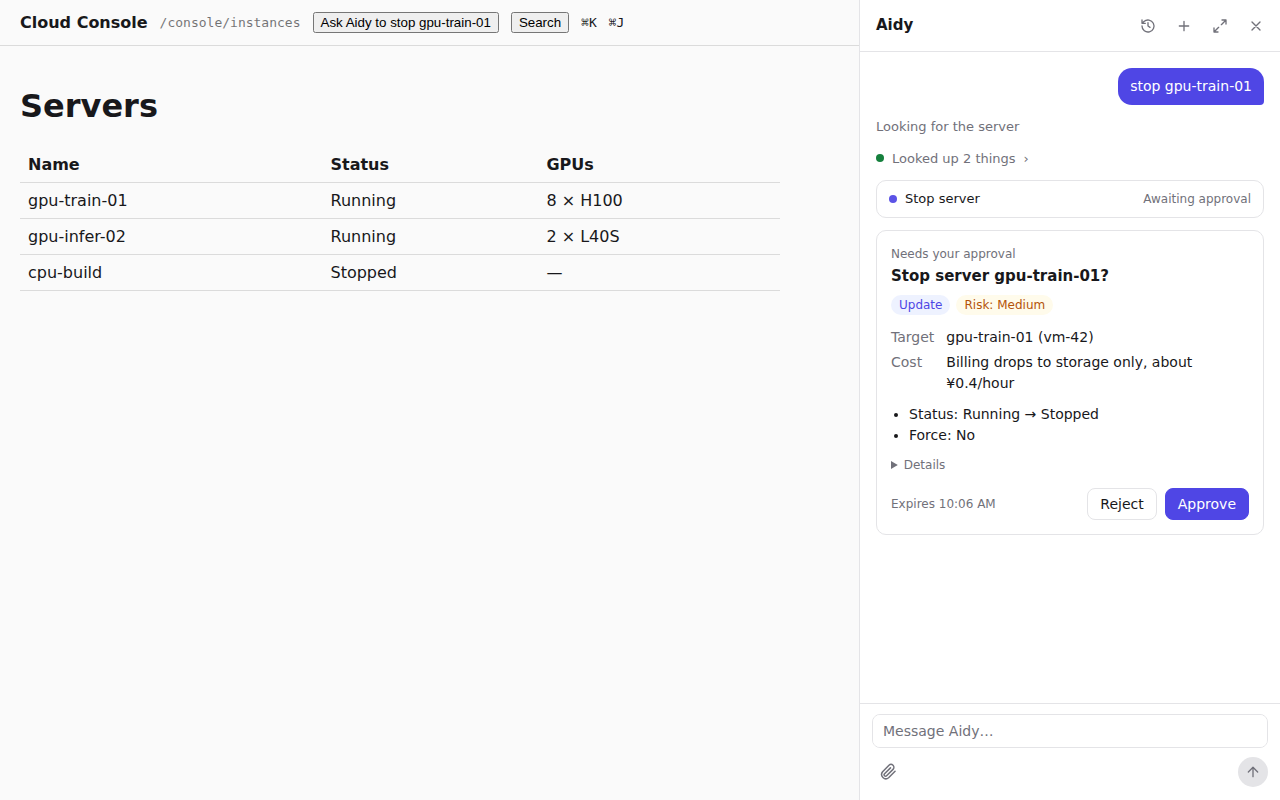
`confirmation` on the operation shapes the card:
```json
"confirmation": {
"title": "Stop server {resource_name}?",
"target": "{resource_name} ({vm_id})",
"fields": [{ "key": "forced", "label": "Force", "values": { "true": "Yes", "false": "No" } }],
"lookup": { "path": "/api/vms/{vm_id}", "labelPath": "name" },
"risk": "medium",
"costHint": "Billing drops to storage only, about ¥0.4/hour."
}
```
Templates take `{argument}` placeholders and `{resource_name}`. With `lookup`, rungent makes a `GET`
of `path` as the user before the card and reads `labelPath` from the answer as `{resource_name}`,
so the user sees `gpu-train-01` where the model passed `vm-42`. The path must be served by a
`GET` operation of the catalog, and a lookup that fails stops the call. Without `confirmation`,
the card's title is the operation's `title`. Every key is in [x-rungent](x-rungent.md#confirmation).
## The approval binds to the exact arguments
When the card appears, rungent freezes the arguments it shows and stores the approval with their
hash, `argsHash`: base64url SHA-256 of the arguments as canonical JSON
([RFC 8785](https://www.rfc-editor.org/rfc/rfc8785)). The client answers with the hash it showed.
- A hash that differs from the stored one is refused, and nothing runs.
- rungent runs the frozen arguments; an answer cannot substitute others.
- Each approval runs at most once, even when two rungent replicas receive the answer at once.
- A confirmed call always finishes and is recorded, even if the user closes the page.
- An approval expires 15 minutes after the card appears. Approving it later, rejecting it, or
sending a new message instead runs nothing, and the model tells the user so.
- Rejecting a card ends the turn: nothing more runs, the model writes nothing, and the dock shows
the change as rejected. The user's next message starts afresh.
## Outside the assistant
Forms belong to the assistant: MCP clients and the CLI pass an operation's complete arguments,
and the same input schema checks them. Every surface still asks before a write:
- **MCP.** A write on the `mcp` surface asks the user through MCP elicitation, with the same
title, target and changes. A client without elicitation gets `not_executed`, and nothing runs.
- **CLI.** The CLI asks `[y/N]` on the terminal; `--yes` confirms for scripts. Without a terminal
and without `--yes`, the write is declined.
Both carry an approval id in the assertion, so your API's check is the same everywhere.
## Where to go next
[Search and knowledge](search.md) covers how the agent finds what the user cannot name.